Showing posts with label Tools. Show all posts

Monday, December 24, 2012

Monday, March 01, 2010

blog ping list

Long blog ping list - compiled from few sources:

http://1470.net/api/ping
http://api.feedster.com/ping
http://api.moreover.com/ping
http://api.moreover.com/RPC2
http://api.my.yahoo.com/RPC2
http://api.my.yahoo.com/rss/ping
http://bblog.com/ping.php
http://bitacoras.net/ping
http://blog.goo.ne.jp/XMLRPC
http://blogdb.jp/xmlrpc
http://blogmatcher.com/u.php
http://blogsearch.google.com/ping/RPC2
http://bulkfeeds.net/rpc
http://coreblog.org/ping/
http://mod-pubsub.org/kn_apps/blogchatt
http://ping.amagle.com/
http://ping.bitacoras.com
http://ping.blo.gs/
http://ping.bloggers.jp/rpc/
http://ping.blogmura.jp/rpc/
http://ping.cocolog-nifty.com/xmlrpc
http://ping.exblog.jp/xmlrpc
http://ping.feedburner.com
http://ping.myblog.jp
http://ping.rootblog.com/rpc.php
http://ping.syndic8.com/xmlrpc.php
http://ping.weblogalot.com/rpc.php
http://ping.weblogs.se/
http://pingoat.com/goat/RPC2
http://rcs.datashed.net/RPC2/
http://rpc.blogbuzzmachine.com/RPC2
http://rpc.blogrolling.com/pinger/
http://rpc.icerocket.com:10080/
http://rpc.newsgator.com/
http://rpc.pingomatic.com
http://rpc.pingomatic.com/
http://rpc.technorati.com/rpc/ping
http://rpc.weblogs.com/RPC2
http://topicexchange.com/RPC2
http://trackback.bakeinu.jp/bakeping.php
http://www.a2b.cc/setloc/bp.a2b
http://www.bitacoles.net/ping.php
http://www.blogdigger.com/RPC2
http://www.blogoole.com/ping/
http://www.blogoon.net/ping/
http://www.blogpeople.net/servlet/weblogUpdates
http://www.blogroots.com/tb_populi.blog?id=1
http://www.blogshares.com/rpc.php
http://www.blogsnow.com/ping
http://www.blogstreet.com/xrbin/xmlrpc.cgi
http://www.lasermemory.com/lsrpc/
http://www.mod-pubsub.org/kn_apps/blogchatter/ping.php
http://www.mod-pubsub.org/ping.php
http://www.newsisfree.com/RPCCloud
http://www.newsisfree.com/xmlrpctest.php
http://www.popdex.com/addsite.php
http://www.snipsnap.org/RPC2
http://www.weblogues.com/RPC/
http://xmlrpc.blogg.de
http://xmlrpc.blogg.de/
http://xping.pubsub.com/ping/
Technorati Tags: ,,

::boost for C# - Umbrella

Nice project: http://umbrella.codeplex.com/. Provides many components similar to the ::boost basics (like bind()...) - for C#.

Technorati Tags: ,,

Monday, November 09, 2009

How to activate Fusion logs

Technorati Tags:

Fusion.reg file:

Windows Registry Editor Version 5.00
[HKEY_LOCAL_MACHINE\SOFTWARE\Microsoft\Fusion]
"LogPath"="C:\\FusionLogs"
"ForceLog"=dword:00000001

Sunday, July 26, 2009

How to: Update Windows driver from command line


  • Download DevCon from here
  • Create list of drivers on your machine: devcon drivernodes * > drivers.txt
  • Find driver you want to update in the list, e.g. SoundMAX Integrated Digital Audio
  • You may check that you've selected the proper driver running
    devcon status "PCI\VEN_8086&DEV_24D5&SUBSYS_80F31043&REV_02" Please note that you should include driver ID in "quotation marks" and use part of string up to REV_02 (revision part).
  • run devcom updateNI using following parameters:
      Use name of inf file from Inf file is ...
      Use driver ID from line in the end of that section, but only up to and including" "Revision" part, e.g. PCI\VEN_8086&DEV_24D5&SUBSYS_80F31043&REV_02\3&267A616A&0&EA
  • Command line would be something like:
    devcon update "c:\windows\inf\oem0.inf" "PCI\VEN_8086&DEV_24D5&SUBSYS_80F31043&REV_02"

  • Thursday, June 25, 2009

    Use Beyond Compare with Team Foundation Server in VS 2008/VS2005


    VS2008 → Tools → Source Control → Visual Studio Foundation Service → Configure User Tools:
    • Compare → C:\Program Files\Beyond Compare 3\BComp.exe → %1 %2

    • Merge → C:\Program Files\Beyond Compare 3\BComp.exe → %1 %2 /savetarget=%4 /title1=%6 /title2=%7


    Tuesday, June 16, 2009

    Productivity tools suite


    This post would be periodically updated and contain list of best tools for personal use.
    (Updated: 23/12/2009)


    Blogging

    w.bloggar - free blog editor; integrates with most of blogging platforms.
    Windows Live Writer – same… slim UI.


    Productivity

    • Office:
      Copernic Search Desktop - Index and search your e-mails (in non-commercial version indexes mails only). Interface is outlook-oriented and it's easier to use then Google Desktop.
      Google Calendar Sync - automatically synchronize Outlook and Google Calendar.
    • Health:
      Workrave - assist healthy work organization by reminding to make exercises and mini-breaks
      Aire Freshener - Nature sounds player - good for relaxation (see why).


    Security

    • Antivirus:
      Avira Antivir - Free Edition - great for home use
    • Firewalls:
      PC Tools Firewall Plus - easy to use personal firewall - the only one which is free for personal use and works with Windows 2003
      Agnitum Outpost Free Edition - great for home use
    • File system:
      Eraser - secure data removal tool.
      True Crypt - open-source virtual encrypted disk
    • Security Scanners:
      Secunia PSI - check whether any installed software requires upgrades. Download and install update patches automatically.
      Microsoft Baseline Security Analyzer - check missing security updates and detect some security breaches. May scan range of PC's in a network.
    • Passwords Management:
      KeePass - Manage all your password in encrypted container. Freeware; support search, groups, expiration control, language packs.


    Sound, Music, Video, Images

    • MP3:
      MP3 Split - Open-source & freeware application to split MP3 & OGG files by size, duration etc (without decoding). I using it really heavily to split audiobooks into chunks of 15-20 minutes and listen them while driving to work. It has command line and UI version (GTK). If you use it to split audiobook - select "auto-adjust mode" in Preferences to automatically split around silence zones.
    • Video:
      Media Player Classic - looks like old-style Windows Media Player but provides major features and supports many video formats.
      VLC Media Player - open-source media player, support virtually every format...
      XP Codec Pack - codecs for majority of video formats.

    • Image editors & viewers:
      Paint.NET - opensource image editor.
      FastStone Image Viewer - free image browser, converter and editor.


    System

    • Sniffers:
      Ethereal - comprehensive network sniffer - Windows + #nux. Free.
    • Web Sniffers:
      Fiddler - free web (HTTP/HTTPS) sniffer & debugger.
      HttpWatch - web sniffer & debugger with programmatic (C#, Javascript & Ruby) automation interface. Free in basic edition.
      TracePlus & Web Detective - bundle of regular & web sniffer - no free edition.


    System Tools

    • Download Managers:
      Free Download Manager - free, GNU license
      Flashget - Free, built-in ads
    • Miscellaneous:
      Process Tamer - monitor and dynamically adjust CPU usage of running processes.
      Shadow Copy - Copy files (including locked files!) or entire drives.
      Unlocker - check which process locks your file and unlock it.
      VirtuaWin - virtual desktop manager.
      Windows Installer CleanUp Utility - Uninstall any component installed on your system. Usefull to resolve installation problems.
      WinUpdatesList - list all windows updates on the system and provide extensive information on each (install date, install user, list of files) + show uninstall command for the update (properties window).


    Monday, June 01, 2009

    Comprehensive list of Debugger Visualizers for Visual Studio


    Here is a comprehensive list of Debugger Visualizers for Visual Studio.
    It's based on (sorted and merged) info from here, here and here and my own additions.

    Here you go:

    ASP, WEB:
    ASP.NET control graph visualizer - http://odetocode.com/Blogs/scott/archive/2006/01/12/2726.aspx
    ASP.NET Cache Visualizer - http://blog.bretts.net/PermaLink,guid,07cd8437-862e-45c6-b24e-3a286fce1b66.aspx
    ASP.NET Control Visualizer - http://blog.bretts.net/PermaLink,guid,87d735a0-1592-4711-860f-8a1d29c9630f.aspx
    ASP.NET Visualizers - http://weblogs.asp.net/scottgu/archive/2006/01/12/435236.aspx
    WebVisualizers - http://webvisualizers.codeplex.com/


    Graphics & UI:
    Bitmap Debugger Visualizer - http://blogs.geekdojo.net/brian/archive/2006/08/06/bitmapvisualizer.aspx
    Graphics Debugger Visualizer - http://www.codeproject.com/KB/macros/GraphicDebuggerVisualizer.aspx
    ControlTree visualizer - http://odetocode.com/Blogs/scott/archive/2006/01/12/2726.aspx


    DataSource & Data:
    Data Debugger Visualizer - http://www.codeproject.com/KB/grid/datadebuggervisualizer.aspx
    Debugger Visualizer for Visual Studio - http://coding-time.blogspot.com/2009/03/debugger-visualizer-for-visual-studio.html
    Mole Visualizer For All Project Types - http://www.codeproject.com/KB/macros/MoleForVisualStudio.aspx
    http://www.moleproject.com/
    http://joshsmithonwpf.wordpress.com/mole/
    Righthand Dataset Debugger Visualizer - http://cs.rthand.com/blogs/blog_with_righthand/pages/Righthand-Dataset-Debugger-Visualizer.aspx
    XML Visualizer - http://blogs.conchango.com/howardvanrooijen/archive/2005/11/24/2424.aspx
    IEnumerable Visualizer -
    http://rapiddevbookcode.codeplex.com/wikipage?title=EnumerableDebugVisualizer

    LINQ, DB:
    DB Connection Visualizer - http://dbvisualizer.codeplex.com/
    LINQ Expressions DebuggerVisualizer - http://www.manuelabadia.com/blog/PermaLink,guid,9160035f-490f-46bd-ab55-516b5c7545af.aspx
    LINQ Expression Tree Visualizer- Look in VS 2008 Samples
    LINQ to SQL Debug Visualizer - http://weblogs.asp.net/scottgu/archive/2007/07/31/linq-to-sql-debug-visualizer.aspx
    LINQ Query Visualizer - http://msdn.microsoft.com/en-us/library/bb629285.aspx
    LINQ to SQL Visualizer - http://weblogs.asp.net/scottgu/archive/2007/07/31/linq-to-sql-debug-visualizer.aspx
    LINQ to Entity Visualizer - http://visualstudiogallery.msdn.microsoft.com/en-us/99468ece-689b-481c-868c-19e00e0a4e69


    System & miscellanea:
    CAB Visualization - http://www.codeplex.com/WorkItemVisualizer
    GUID Debugger Visualizer - http://devmatter.blogspot.com/2006/04/guid-debugger-visualizer-for-visual.html
    IL Visualizer - http://blogs.msdn.com/haibo_luo/archive/2006/11/16/take-two-il-visualizer.aspx
    Improving Visual C++ Debugging - http://www.codeguru.com/columns/kate/article.php/c15291
    PowerShell Debug Visualizer - http://poshdebugvisualizer.codeplex.com/
    Regular Expression Visualizers - http://weblogs.asp.net/rosherove/archive/2005/11/26/AnnoucingRegexKit10.aspx
    Sharepoint debug visualizer - http://spdv.codeplex.com/
    WindowsIdentity Debugger Visualizer - http://geekswithblogs.net/khanna/archive/2006/01/05/64903.aspx


    WCF:
    WCF Visualizers Tool - http://wcfvisualizer.codeplex.com/


    WPF:
    WPF Tree Debugger Visualizer - http://wpftreevisualizer.codeplex.com/
    DepO WPF Dependency Object Visualizer - http://www.codeplex.com/dathanliblikdepo
    WPF Debugger Visualizer - http://blogs.oosterkamp.nl/blogs/thomas/archive/2009/03/11/wpf-debugger-visualizer.aspx
    XAML Debugger Visualizer for WPF - http://www.codeproject.com/KB/WPF/XamlVisualizer.aspx
    Snoop - a WPF Utility - http://blois.us/Snoop/


    XML:
    Xml Visualizer v.2 - http://www.codeplex.com/XmlVisualizer
    Lithium XML Debugger Visualizer - http://blogs.conchango.com/howardvanrooijen/archive/2005/04/11/1267.aspx


    Sunday, April 26, 2009

    Manually scheduling Check Disk upon next computer restart


    Set following value in BootExecute key of [HKEY_LOCAL_MACHINE\SYSTEM\ControlSet001\Control\Session Manager] registry entry:

    autocheck autochk /r \??\C:autocheck autochk /r \??\D:autocheck autochk *


    Monday, January 12, 2009

    Top N Firefox Addons/Extension


    Updated: 23/7/2009

    First of all - why Top N? Well, it's just cause I'm completely fatigued by all those "Top 10..", "Top 50..", "Best everyday..." and similar that became ubiquitous in the blog space.

    So here is just the list of FireFox addons that I found to be useful for myself and use on everyday basis.
    I basically gonna use this post as a book-keeping entry to myself.

    Here it goes:

    1. Adblock Plus - cleans out most of annoying ads from web pages you visiting. Supports update of cleaning rules set (check it in its options). Enables to create your own blocking rules for the stuff you don't want to see.


    2. BugMeNot - automatically login to forums and site, for which you were to lazy to pass tedious registration process using infamous http://www.bugmenot.com/ site.

    3. Download Statusbar - see download status and manage your downloads from a tidy status bar, rather that using default download window.
    4. FoxyProxy - easy proxies management.

    5. Video Download Helper - instantaneously download videos displayed on a web-page you visit (e.g. YouTube).


    6. FlashGot - instantaneously integrate your favourite downloads manager with FireFox.


    7. Foxmarks Bookmark Synchronizer - this one is especially cool. Synchronize your bookmarks between your computers (work/home/laptop/...). Don forget to set HTTPS as a default communication protocol in option to secure your information!

    8. Gmail Notifier - get notifications on new e-mails in your Gmail account, check mails and easily switch between few Gmail accounts.


    9. IE Tab - open sites in FireFox-hosted IE window by one click. Setup sites to be automatically opened in embedded IE tab.

    10. LinkedIn Companion for FireFox - manage you Linked In account and automatically get job insiders in your network for the site you've visited.


    11. NoScript- disable/enable JavaScript per site or globally for better security.


    12. PDF Download - whenever you click link to a PDF document - you may choose to either Save, Open or Open as HTML.


    13. Tab Mix Plus - improved tabs management + possibility to save sessions/lists of currently open tabs.


    14. Ghostery - show list of web trackers used by site you visiting.


    Thursday, August 28, 2008

    Enable XSS Detect in VS 2008


    XSS Detect is a code-analysis tool proposed, as suggested by its name, for reveal of XSS vulnerabilities in web-applications.
    It's developed by MS ACE Team and could be downloaded here: XSS Detect

    The problem is that out of the box it works in VS 2005 only. Here is how to enable it in Visual Studio 2008:
    1. Open %USERPROFILE%\Application Data\Microsoft\MSEnvShared\Addins

    2. Insert < Version > 9.0 < /Version > in HostApplication section


    Sunday, August 24, 2008

    Monday, August 04, 2008

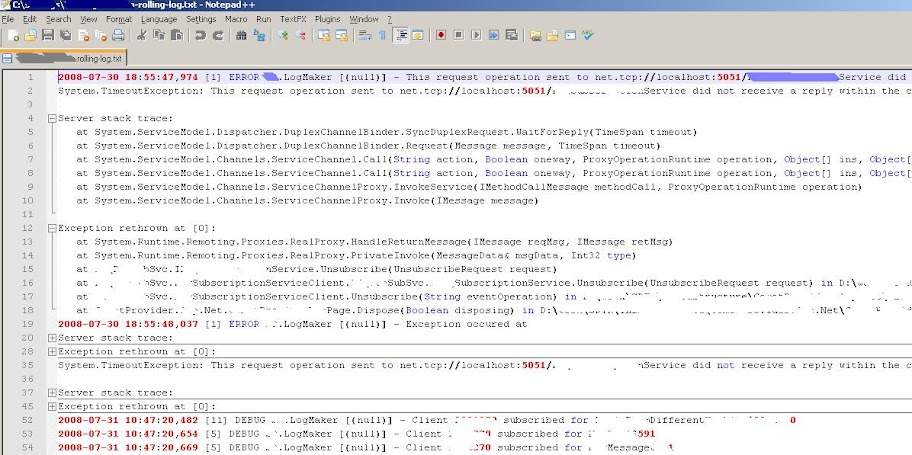
    Viewing log4net files in notepad++


    If you're a frequent user of notepad++ and log4net - here is a nice trick I've discovered, that brings a synergism between two. As you know - notepad++ has an option to highlight syntax for subset of supported languages. It is either applied automatically, based on the file extension or could be chosen manually from the Language menu.
    And here is the trick - just select VB language for opened log4net file (<Alt>+L,V,Enter) and you have a very readable syntactic highlights.


    Thursday, August 09, 2007

    Consolas - ClearType font optimized for programming environment

    DEV012 Building WPF XAML Browser Applications - few patches

    Few patches you may need to use for this lab:

    1. You getting "Error 32 SignTool reported an error SignTool Error: Signtool requires CAPICOM version 2.1.0.1 or higher" - solutions is here.

    2. You getting "Request for the permission of type System.Net.WebPermission" - it could be caused by a range of reasons. In my case - I needed to set Execute permissions to "Scripts only" rather than "Scripts and Executables". If it not helps you - here few more receipts:

    Wednesday, March 07, 2007

    How to use w.bloggar after switching to Google Account on blogspot.com


    Here is a detailed explanation on how to use w.bloggar for posting to blogspot after switching to Google Account.
    Just to add that host to be referenced is still beta.blogspot.com

    Sunday, February 26, 2006

    10 must-have Visual Studio add-ins


    An interesting article, published in the last issue of MSDN Magazine - Visual Studio Add-Ins Every Developer Should Download Now. The article lists some very useful VS add-in tools. For me - few were new, so some could be new for you too!